The subcontract, the schedule of values, and the paperwork that has to be current.
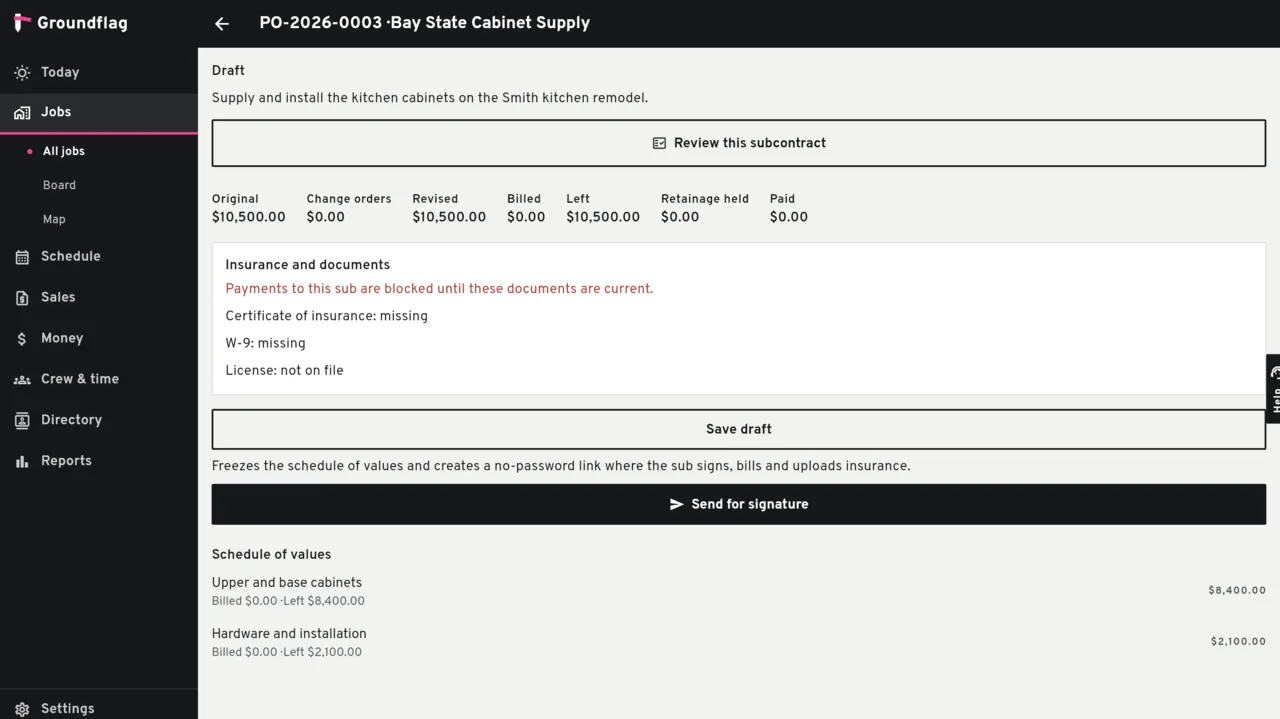
You write the scope and the lines. Sending it gives the sub a link with no password. The sub reads the scope, signs, bills a line and sends the COI, the W-9 and the license.
Money stays on the job
Committed.
The lines are the schedule of values. A draft can change. After it is sent, a change is a sub change order: new lines, numbered, with a reason. Negative lines reduce the committed cost.
The sub's bill.
A bill from the portal starts as pending, so the office checks it. A bill from the office starts as a draft. A line cannot be billed above what is left on it.
Retainage.
The amount held is stored on the bill, and the total due is already net. Releasing retainage is a bill with a negative hold and no lines. It does not add cost to the job a second time.
What blocks a payment
Paying a subcontract bill checks the newest COI (in date), a W-9 on file, and a license in date when a license is on the vendor. A payment that arrives from QuickBooks is a fact from that system and does not take this path.
A lien waiver on the bill is a switch on the subcontract, off unless you turn it on. Production refuses to turn it on, so a signature link that is not available there can never block a payment.
Not on this screen
Asking a sub to price a change before you write it is not part of the subcontract. Editing or deleting the subcontract through the ordinary purchase-order screens is refused.
Questions
Does the sub need an account?
No. The link opens the subcontract on your company's portal.
Does retainage hit the job twice?
No. Job cost uses the gross (the bill plus the hold). Releasing the hold does not add cost.
Keep reading
Questions? Write to hello@groundflag.com