A schedule that moves the way the job does.
Each job has its schedule as a Gantt chart. Link the tasks once; when one slips, the work that depends on it moves with it, and the baseline shows how far the job has drifted.
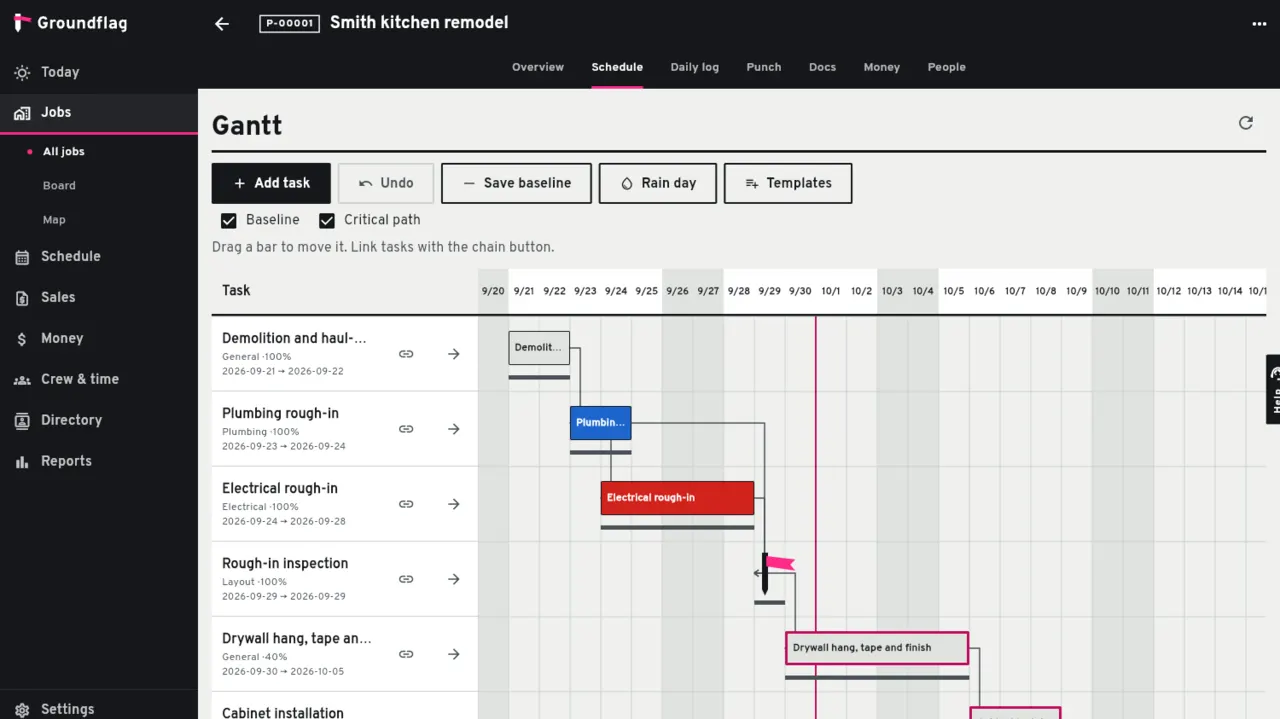
Linked once, moved together
Dependencies.
Finish to start, start to start, finish to finish and start to finish, each with a lag in days. Move a task by dragging it or with the move button; the tasks after it shift and keep their slack.
The company calendar.
Working days, company holidays and the lunch break are part of the math, so dates land on days the crew works.
Critical path and baseline.
The critical path is marked. The baseline is saved when you choose to and replaced only on purpose, so the drift is honest.
Undo.
Moved the wrong bar? One step back puts it, and everything that moved with it, where it was.
Rain days
One tap on a rain day pushes the day's work and everything that depends on it, and writes the delay into that day's daily log, so the reason for the slip is on record.
Beyond one job
The company calendar shows every job, the crew board shows who is where, and the 21-day lookahead is the list a foreman needs for the weeks ahead. Schedule templates by job type start a new job with its usual sequence. Microsoft Project files (XML) import into a job and the job's schedule exports back.
Telling the crew and the subs
When dates change, the people on those tasks get an email. A sub who only has a phone number can get a text message, if the company turns that on in Settings.
Questions
Can I import my schedule from Microsoft Project?
Yes. Import the Microsoft Project XML file into a job, and export the job's schedule back the same way.
Does a change order move the schedule?
An approved change order with schedule days shows a notice on the schedule. Dates move only when a person moves them.
Keep reading
Questions? Write to hello@groundflag.com