A Jobber alternative built around the whole construction job.
Jobber is strong at booking service work and keeping customers informed. Groundflag puts the estimate, schedule, field record, change orders and job costs on one construction project.
Where Jobber is strong
Jobber gives service businesses online request and booking flows, scheduling, and a Client Hub where customers can review quotes, pay invoices and see appointments. If your work is mostly service calls and dispatch, those are useful tools.
Keep the construction job connected
Plan the work.
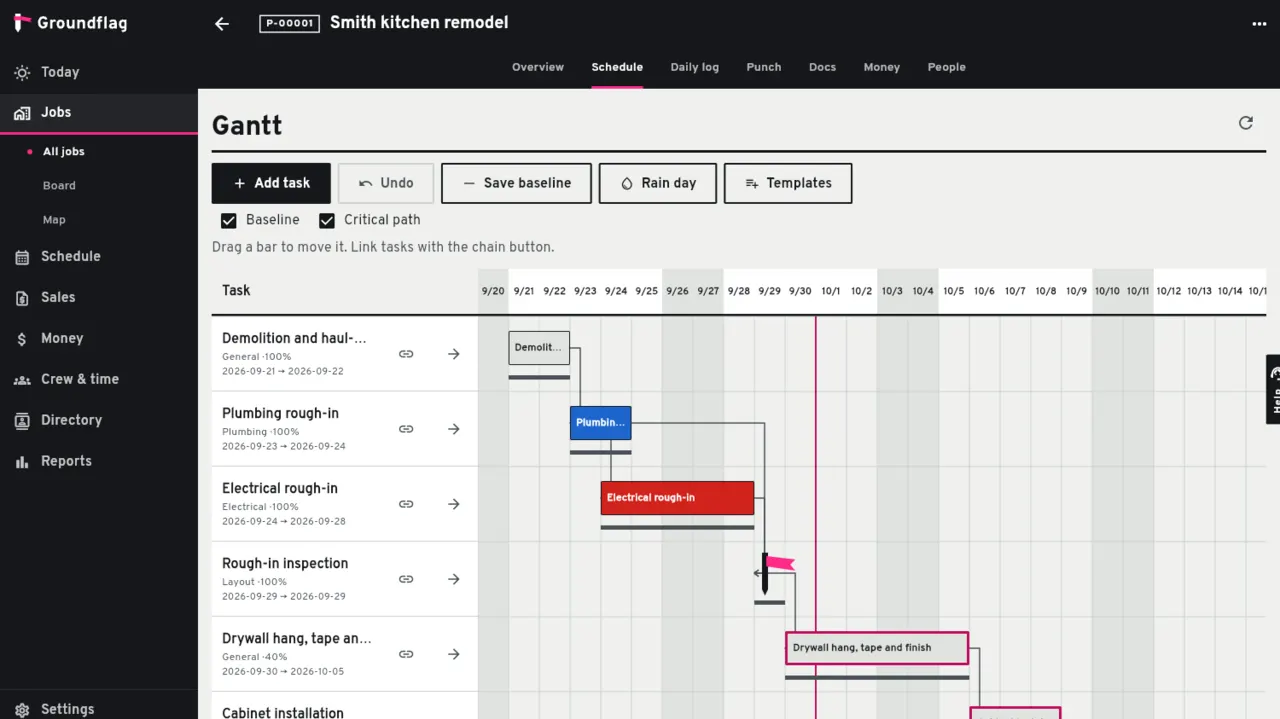
Use a Gantt schedule with task dependencies, then keep the daily log, crew time, photos and documents on the job.
See the job money.
Track budget, committed and actual costs by cost code, and keep estimates, invoices and change orders with the project.
Let the client act.
Clients can review and approve estimates, sign change orders, pay invoices or deposits, and exchange files in the Groundflag portal.
Bring the field along.
The foreman can dictate a daily log in English, Spanish or Portuguese; Groundflag drafts it for review and signature.
Know what is not there yet
Each company chooses what its public booking page takes: a request to review later, a scheduled assessment, or a direct job, with photos either way. Once the company turns it on, the client portal lists upcoming visits with the date, arrival window, status and crew name. Groundflag does not collect a card during intake yet, and the portal shows no crew profile with a photo. If card capture at booking is central to your business, Jobber covers that today.
Side by side
| Groundflag | Jobber | |
|---|---|---|
| Online intake | Request, scheduled assessment or direct job, chosen per company, with photos | Requests, assessment booking and direct job booking |
| Card during booking | Not yet | Can collect card details during request or booking |
| Client portal | Estimate approval, change orders, invoices, deposits, files and upcoming visits | Requests, quotes, invoices and appointment details |
| Construction schedule | Gantt with task dependencies | Scheduling for service work |
| Daily field record | Voice-drafted daily log, plus job photos and time | Service job forms and field records |
| Job costs | Budget, committed and actual by cost code | Job costing and business reports |
| Payroll hours | Approved time exports as a Gusto, ADP, Paychex, Paylocity or QuickBooks file, no connection fee | Paychex Flex sync in the United States, with a $25 a month connection fee |
| Claude and ChatGPT | Connector on every plan: looks up jobs, clients, estimates, invoices and time cards; creates clients, jobs, tasks and RFIs, logs the day, sends estimates and invoices (it never moves money) | Connector can look up records and create requests, clients, properties and quotes |
Questions
Is Groundflag a fit for a home service company?
It can fit a contractor who manages projects with schedules, change orders and job costs. If your day is mainly dispatching short service calls with card capture at booking, Jobber has more of that flow today.
Can my clients approve work and pay online?
Yes. Clients can approve estimates, sign change orders, pay invoices or deposits, and access shared files in the Groundflag portal.
Can I bring my clients from Jobber?
Yes. In Jobber an admin exports the client list as CSV (Clients, More Actions, Export Clients). In Groundflag, Import data with Jobber as the source matches names, phones, e-mail, the property address and notes, and shows a preview before anything is saved. A client with two properties comes in once.
Sources
- Jobber Online Booking help, checked on October 14, 2026
- What clients see in Jobber Client Hub, checked on October 14, 2026
- Connect Jobber to Claude and ChatGPT, checked on November 23, 2026
- Sync your team's hours from Jobber to Paychex Flex, checked on November 23, 2026
Keep reading
Questions? Write to hello@groundflag.com