Buildertrend alternatives for small builders, compared on price and fit.
Looking for Buildertrend alternatives? This comparison helps remodelers and small builders weigh price, project fit, and the work each tool covers. The latest verifiable public price list we found is Buildertrend's own page archived February 28, 2026: it lists Essential at $499/month, Advanced at $799, and Complete at $1,099, with a one-year minimum. Those historical list prices are not a current quote; ask Buildertrend for today's offer. Compare the features, terms and migration steps below.
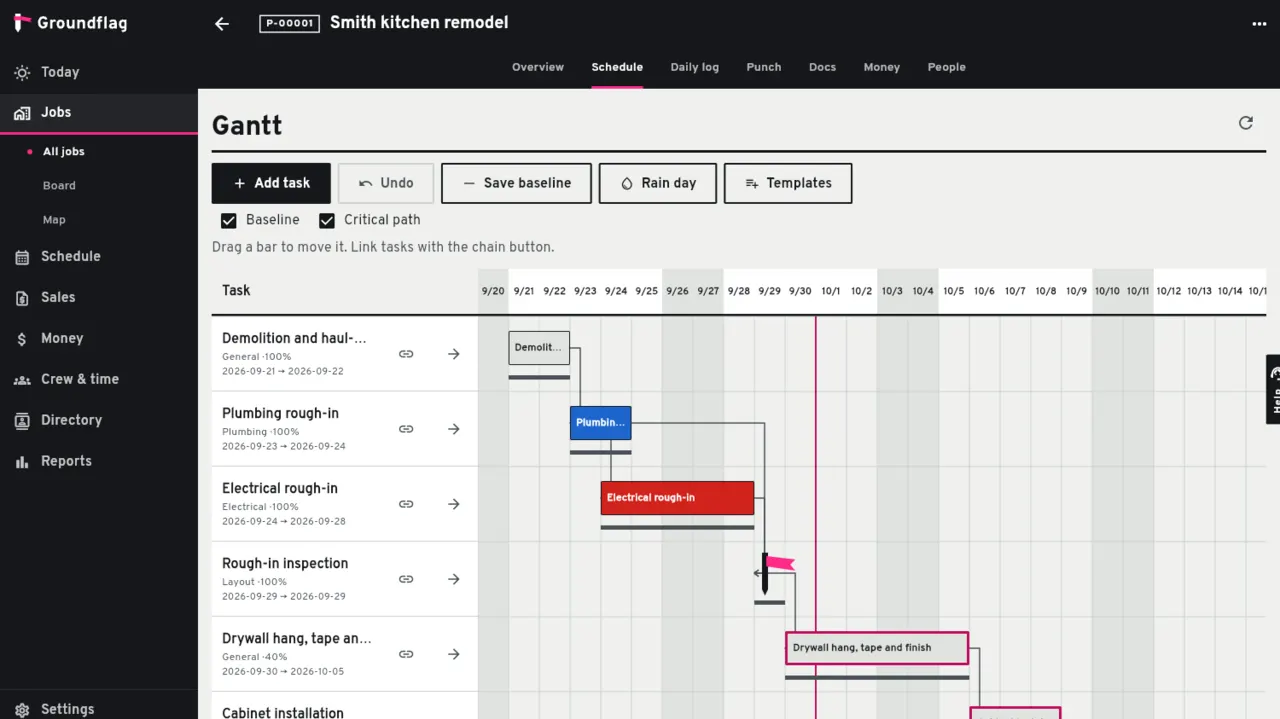
Where Buildertrend is strong
Buildertrend is one of the most complete tools for residential construction: schedules, selections, customer and sub portals, and financials, with 2,487 reviews averaging 4.5 on Capterra. It connects to QuickBooks Online and Desktop, Xero, Sage Intacct and Gusto. If you build custom homes at volume and need deep selection workflows with vendor imports, it goes further than Groundflag today.
What changed at Buildertrend in 2026
On September 29, 2026 Buildertrend announced AI Submittals, AI Bill Capture, AI Client Updates and AI Plans, plus stronger financial workflows for high-volume and complex builds. Groundflag reads a bill with AI too (Bill Capture, live in production since October 19, 2026), drafts an estimate from a scope you type, and the foreman dictates the daily log. The weekly client update is drafted by AI too, from the week's daily logs, shared photos, signed change orders and the next days of the shared schedule, in the client's language, for you to review and send. Upload a plan set as a PDF and AI names each plan sheet from its title block (number, title, discipline) before you save, the same job AI Plans does. The CoConstruct builder migration is still under way, so an existing CoConstruct account is a Buildertrend account now.
What it costs, and what reviews say about that
The current price is not public in the sources we could verify. Buildertrend's own pricing page, archived February 28, 2026, lists Essential at $499 a month, Advanced at $799 and Complete at $1,099, with a one-year minimum and paid support tiers of $100 or $300 a month. At those list rates the one-year minimum is about $5,988, $9,588 or $13,188 a year before support add-ons. Those historical list prices are not a current quote. A review by Connecteam reports quotes of $9,000 to $14,000 a year for a builder doing $1 to 5 million.
Its Capterra reviews say it plainly: "The cost is pretty high." Others write about getting their data out: "No simple or bulk way to download years of data."
Who each Buildertrend alternative fits
Stay on Buildertrend when you run high-volume custom homes and need deep selections with vendor imports, or when your accountant already lives in its financial stack. Pick another Buildertrend alternative when the quote is the blocker, your crew needs Spanish or Portuguese on every screen, or you want month-to-month pricing you can read before you call sales. Groundflag fits remodelers and small builders who want that published company price with schedule, change orders, job costing and a daily log by voice in one place.
How Groundflag is different
A price you can read.
Crew is $149 a month, Pro $199 and Business $299, for the whole company, every user included. Month to month, cancel in the app, 30 days free with no card. Crew billed yearly is $124 a month ($1,488 a year).
Spanish and Portuguese on every screen.
We found no Spanish interface in Buildertrend. In Groundflag each person works in English, Spanish or Portuguese.
Change orders the client signs.
The client approves a change order online with their name and consent; the contract, budget and next invoice update with it.
The daily log by voice.
The foreman taps a button and talks; Groundflag drafts the log for them to sign.
Moving from Buildertrend to Groundflag
Buildertrend exports every list as an Excel file from the grid itself. Clients, cost codes, catalog items and jobs come over as CSV, with a preview of every row before anything is saved. Schedules, daily logs, photos, bills, invoices and change orders stay where they are, so download the files and reports you may need later before you cancel.
Read the how-to.
The steps, column by column: /help/import-from-buildertrend.
Ask for help.
Send the files and we map them for you. Write to hello@groundflag.com.
What Groundflag does not do yet
Selections are new and simple: options with photos and prices against an allowance, the client picks and signs on the portal, and going over drafts the change order. There are no vendor imports or selection comments yet. The client portal also covers estimates, contracts, change orders, invoices, payments and files, and progress billing works today. The apps are on the App Store (iPhone) and Google Play (Android).
Other Buildertrend alternatives and competitors
Builders who compare Buildertrend usually look at a few more tools. Each one fits a different shop, and each has its own side-by-side page with sources:
JobTread.
Strong estimating, budgets and job costing, with a 4.9 average on Capterra; it charges for each office user.
Contractor Foreman.
A long feature list at a lower price than Buildertrend; its plans are set by how many users you have.
Houzz Pro.
Made for design-build and remodelers who sell with mood boards, 3D and selections.
CoConstruct.
Buildertrend bought it in February 2021 and is moving its builders over, so it is not a separate choice any more.
Groundflag.
One published price for the whole company, every screen in English, Spanish and Portuguese, and a daily log by voice.
Side by side
| Groundflag | Buildertrend | |
|---|---|---|
| Published price | Yes: $149, $199 or $299 a month | No current public rate; February 2026 archive lists $499 to $1,099 a month |
| One-year list cost (archive) | Crew yearly: $1,488 ($124 a month) | About $5,988 / $9,588 / $13,188 at Essential / Advanced / Complete list rates |
| Term | Month to month, or annual with 2 months free | One-year minimum term |
| Users | Unlimited, every plan | Unlimited, price follows construction volume |
| Spanish interface | Every screen, plus Portuguese | Not found (App Store lists English) |
| Selections and allowances | Yes: photos, client signs on the portal, overage drafts a change order | Yes, with vendor imports |
| AI on the job | Bill capture, estimate draft, weekly client update, plan sheet names, daily log by voice | AI Submittals, Bill Capture, Client Updates and Plans (September 2026) |
| Native iOS and Android apps | Yes: App Store and Google Play | Yes |
Questions
Is Groundflag a Buildertrend alternative?
Yes, for remodelers and small builders who want a published company price, English/Spanish/Portuguese on every screen, and schedule, change orders, job costing and a daily log by voice in one tool. Buildertrend still goes deeper on high-volume custom-home selections with vendor imports.
Does Groundflag have AI like Buildertrend?
Yes. Every plan includes AI actions each month. AI reads a bill from a photo (Pro and up), drafts an estimate from the scope you type, drafts the weekly client update from the daily logs, names plan sheets from the title block and turns the foreman's voice into the daily log. Nothing is saved or sent until a person reviews it. Groundflag has no AI for submittals yet.
Is Groundflag for custom home builders?
For small builders, yes: schedule with dependencies, change orders, budget and job costing work today. Selections against an allowance work too, in a simpler form than Buildertrend.
How long is the commitment?
None. Monthly plans have no contract; annual plans cost two months less.
How much does Buildertrend cost?
Buildertrend does not publish a price; it quotes one. The quote data on its pricing page, archived in February 2026, listed Essential at $499 a month, Advanced at $799 and Complete at $1,099 month to month, with a one-year minimum term (about $5,988, $9,588 or $13,188 a year at those list rates). Groundflag is $149, $199 or $299 a month for the whole company, month to month.
What are the main Buildertrend competitors?
For residential builders and remodelers: JobTread, Contractor Foreman, Houzz Pro and Groundflag. CoConstruct used to be one; Buildertrend bought it in 2021.
Which Buildertrend alternative is best for a small builder?
There is no best fit for every shop. JobTread emphasizes estimating and job costing; Contractor Foreman offers broad project tools; Houzz Pro fits design-build; Groundflag publishes month-to-month company pricing and supports English, Spanish and Portuguese. Compare the linked pages and confirm current terms before switching.
Is CoConstruct part of Buildertrend?
Yes. Buildertrend acquired CoConstruct in February 2021 and is moving CoConstruct builders to Buildertrend. If you have to move anyway, Groundflag imports your CoConstruct leads from a CSV.
Does Groundflag have cost codes and estimate templates like Buildertrend?
Yes. Every job carries cost codes (a residential-by-phase library and a short CSI MasterFormat library, both editable) with budget, committed and actual, and you can save any estimate as a company template and start the next one from it.
Can I bring my jobs and catalog from Buildertrend?
Yes. In Buildertrend, click Export in the top right corner of the Jobs List, Cost Codes or Cost Catalog grid and save the Excel file as CSV. In Groundflag, Import data with Buildertrend as the source matches job names, numbers and clients, cost codes and catalog items, and shows a preview before anything is saved.
Sources
- Buildertrend pricing page (archived), checked on February 28, 2026
- Buildertrend reviews on Capterra, checked on October 14, 2026
- Buildertrend review by Connecteam, checked on September 2, 2026
- Buildertrend marketplace, checked on October 14, 2026
- Buildertrend on the App Store, checked on October 14, 2026
- Buildertrend acquires CoConstruct (press release), checked on February 24, 2021
- Buildertrend expands its platform with AI and financial tools (press release), checked on September 29, 2026
Keep reading
Questions? Write to hello@groundflag.com